
A True Drag-and-Drop Editor for Home Assistant
Stop editing YAML. Drag widgets in, size them exactly how you want, layer and align them with pixel-perfect control, and watch your dashboard come together in real time.
Design like a pro — no code required
The improved editor is fast, precise, and forgiving. Build for any screen without touching a config file.
Pixel-Perfect Placement
Position and resize every widget freely. Snapping and alignment guides keep things tidy; free-form control keeps them yours.
Layers & Grouping
Stack, layer, and group widgets to build rich, magazine-style layouts that go far beyond a simple grid.
Responsive or Fixed
Design fluid layouts that adapt to any screen, or fixed-resolution dashboards tuned to an exact tablet or wall display.
Instant, Live Preview
Every change is reflected immediately with live Home Assistant data — what you build is exactly what you’ll see on the wall.
From blank canvas to beautiful in minutes
Drag a widget from the library, drop it into place, and style it — colors, icons, conditions, and behavior — all without writing a single line of code. Need something exact? Nudge to the pixel. Building for a specific tablet? Dashable can detect and apply the device’s exact screen size so your layout always looks crisp. Whether you’re a first-timer or a power user, the editor gets out of your way and lets you design.
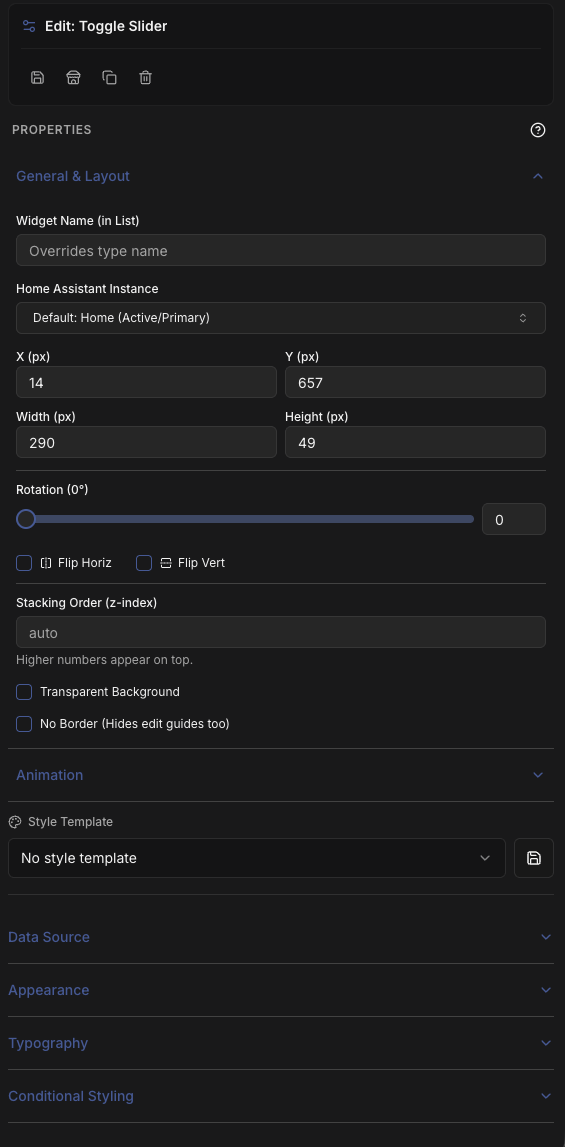
Consistent, powerful widget controls
Every widget shares the same clean, consistent property controls — search-as-you-type entity pickers, connection selectors, and standardized styling sections — so once you’ve configured one widget, you already know how to configure them all. Set a data source, tune the look, add conditional logic, and position it precisely. No hunting through inconsistent panels; just a smooth, predictable way to build.
Editor FAQ
Explore more of Dashable
Every feature, built for a beautiful, private, local-first smart-home dashboard.